The outcome an agent picks at the end of a call is what updates your CRM. Here is how to set those outcomes up.
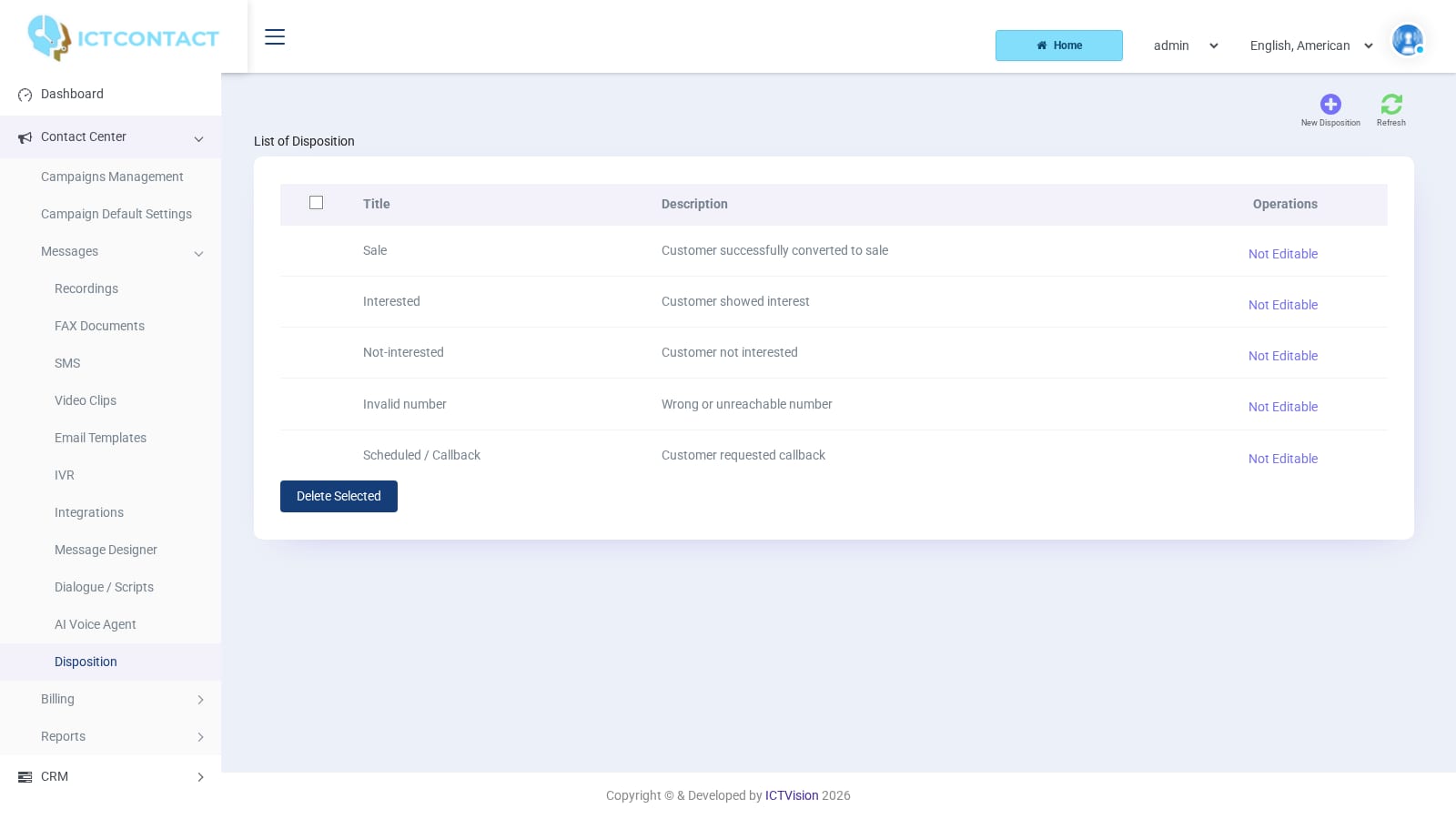
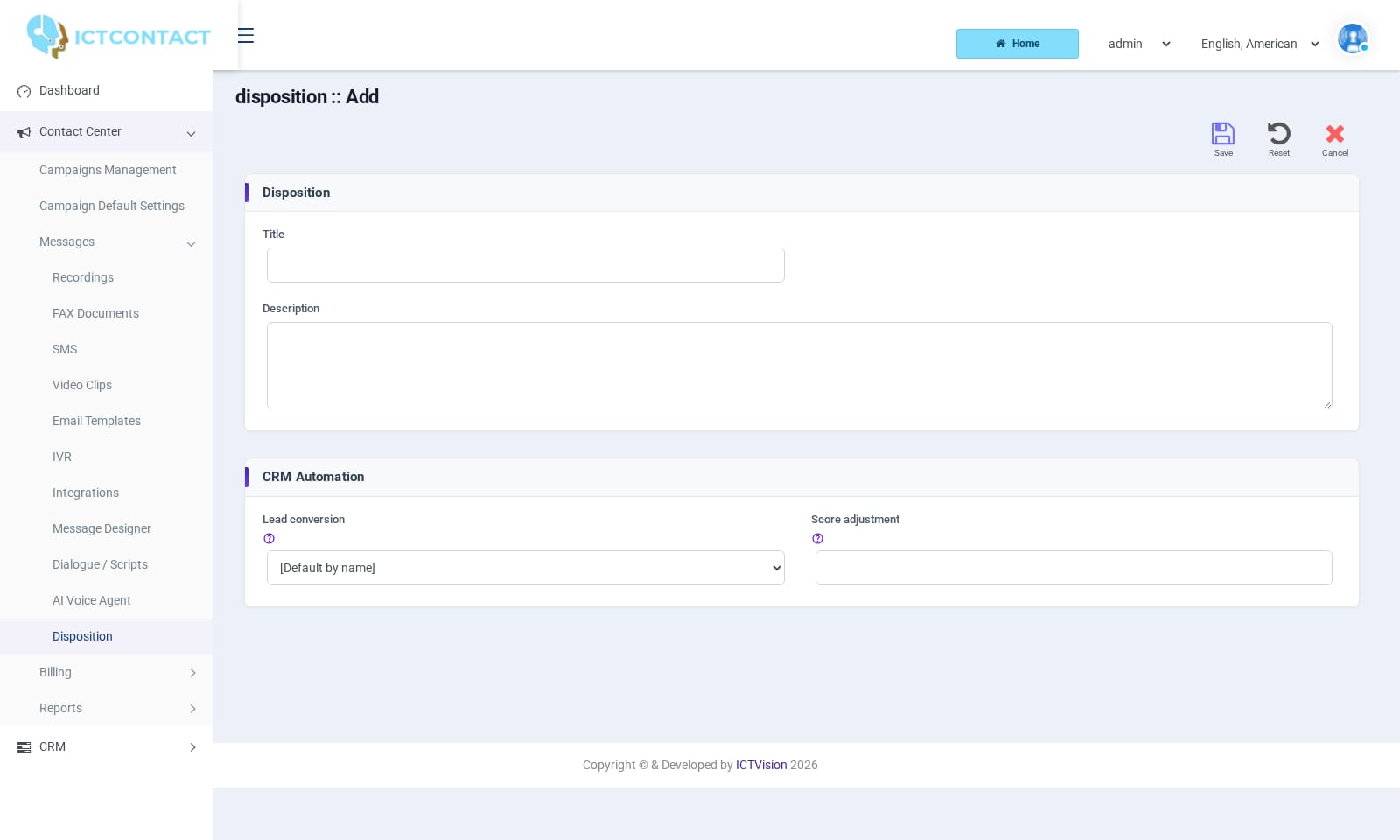
A disposition is the outcome an agent records when a call ends: Sale, Not-interested, callback requested, and so on. You define the list under Contact Center > Messages > Disposition. Agents pick one in the agent panel after each call. The result turns up in the Disposition Report, on the contact's timeline and in the CRM analytics. Dispositions can also move a lead through the CRM automatically. That's what the CRM Automation section on the form is for.
Prefer to watch? Tutorial 8: Dispositions and CRM integrations. The screens show the ICTContact name because ICTCRM runs on it.
The five built-in dispositions
Every account starts with five global dispositions. They're marked Not Editable in the list, and a tenant can't change or remove them.
Title
Description
Default lead action
Default score change
Sale
Customer successfully converted to sale
Convert to Deal (won)
+20
Interested
Customer showed interest
Convert to Contact
+10
Not-interested
Customer not interested
Mark as Junk Lead
-10
Invalid number
Wrong or unreachable number
Mark as Junk Lead
-20
Scheduled / Callback
Customer requested callback
Create callback task
+5
The last two columns show what happens when you leave the CRM Automation fields at their defaults. More on that below.
Adding your own
The list page shows Title, Description and Operations (Edit on your own rows, Not Editable on the global ones). The top buttons are New Disposition and Refresh. To remove dispositions, tick the rows and click Delete Selected. Deleted dispositions are hidden, not purged, so old reports keep their names.
Click New Disposition.
Under Disposition enter a Title (required) and a Description.
Under CRM Automation choose Lead conversion and, if you want, a Score adjustment.
Click Save.
Lead conversion has these options:
[Default by name]: uses the built-in behaviour for the five names in the table above. Any other title does nothing.
No action
Convert to Deal (won): marks the lead Converted, creates a Deals record in status Processed, and sets the record's Stage to Deal Won.
Convert to Contact: marks the lead Converted and creates a Contacts record in status In Progress.
Create callback task: writes a task named "Callback #" into the tasks table, dated today with a deadline of tomorrow. There's no task screen in the current menu, so for now treat this as a database record.
Mark as Junk Lead: sets the lead's Status to Junk Lead.
Conversion only fires when the record the agent dispositioned is a lead (something listed under CRM > Leads). Contacts and deals get the score change and the history entry, but they aren't converted.Score adjustment is a whole number such as 10 or -5. It's added to the contact's Lead Score every time the disposition is used. If you leave it empty, the default from the table applies (0 for custom titles). You can see the running score on the Leads list (Score column) and on the contact timeline card.
How an agent sets a disposition
In the full-page agent panel, the Contact Update tab holds the wrap-up form. After a call the agent:
Picks a value in Disposition. The dropdown starts at [Select a Disposition] and lists the five global ones plus your own.
Types anything useful in Comments.
Sets Re Schedule if the customer wants a callback. The choices are After 10 Minutes, After 30 Minutes, After One Hour, Next Day, Next Week and [Custom Schedule]. Custom shows a Date picker and an At hour:minute pair.
Clicks Save.
Saving does several things at once:
writes the disposition onto the contact
adds a contact_history row with the comments
records a spool result for the campaign
adjusts the score
runs the lead conversion
If the agent chose a reschedule, the same spool entry goes back to pending_retry at the chosen time and expires 12 hours after it. The campaign dials it again when that time comes. The disposition save also assigns the agent to the contact. That's what the Assigned Agent filter on the Leads and Contacts lists uses.Agents can't create dispositions. The list they see is whatever the account owner defined.
Where the results show
Reports > Disposition Report. You get one row per dispositioned call, with the columns Date, Call-ID, Disposition, Comments, Phone, Contact Name, Agent Name, Campaign, Duration, Sentiment, Schedule Time, Username and Action. The Action icons are View Call Detail, plus Download Recording and Play Recording when a recording exists. The search panel filters on Campaign, Agent Number, Disposition, Phone Number, Call Duration and Date (admins also get Client). The top buttons are search, Refresh, Export (CSV) and Print, with Back to Report on the print view.Above the table there's a Disposition Distribution chart and a Disposition Status strip with Total Calls, Success Rate (the share marked Interested), AVG, Handle Time (AHT) in seconds, and Conversion Value.Sentiment isn't an AI rating. It's a colour taken from the global disposition name: Green for Sale and Interested, Red for Invalid number, Yellow for Not-interested and Scheduled / Callback. Custom dispositions always show Yellow.Contact timeline. Open a lead, contact or deal and click Timeline (or the first icon in the row). Each disposition appears as an entry titled "Disposition" plus the name, with the comments underneath, next to calls, notes and messages. The card at the top shows the current Status, Stage, Assigned Agent and Lead Score.CRM > Analytics. The Dispositions (last 30 days) card counts uses per disposition. Conversions (last 30 days) counts how many leads dispositions converted to deals or contacts in that window.
Things to know
You can't rename a global disposition. If you need "Sale" to mean something else, create your own title and set its automation explicitly instead of relying on [Default by name].
Score and conversion are worked out at the moment the agent saves. Changing the automation later doesn't rewrite past calls.
The Disposition form on this build has no integration fields. To push a result to a CRM, attach an Integration to the campaign or IVR instead (see the CRM Integrations Guide).