Ireland’s Data Protection Commission has fined the company behind Tinder €11 million, and the problem wasn’t a breach or a hack. It was a self-service “Download My Data” tool that people used to request a copy of their data, which quietly left some of it out. If your CRM software has an export button that you point people to when they ask what you hold about them, this decision is worth ten minutes of your time.
Here’s what the regulator found, why the fix is mostly about honesty rather than engineering, and how to answer an access request from a CRM without falling into the same trap.
What the DPC decided
The DPC announced the decision against MTCH Technology Services Limited, the Match Group company behind Tinder, on 13 November 2026. It found an infringement of Article 15(3) of the GDPR, which gives people the right to a copy of the personal data a company processes about them.
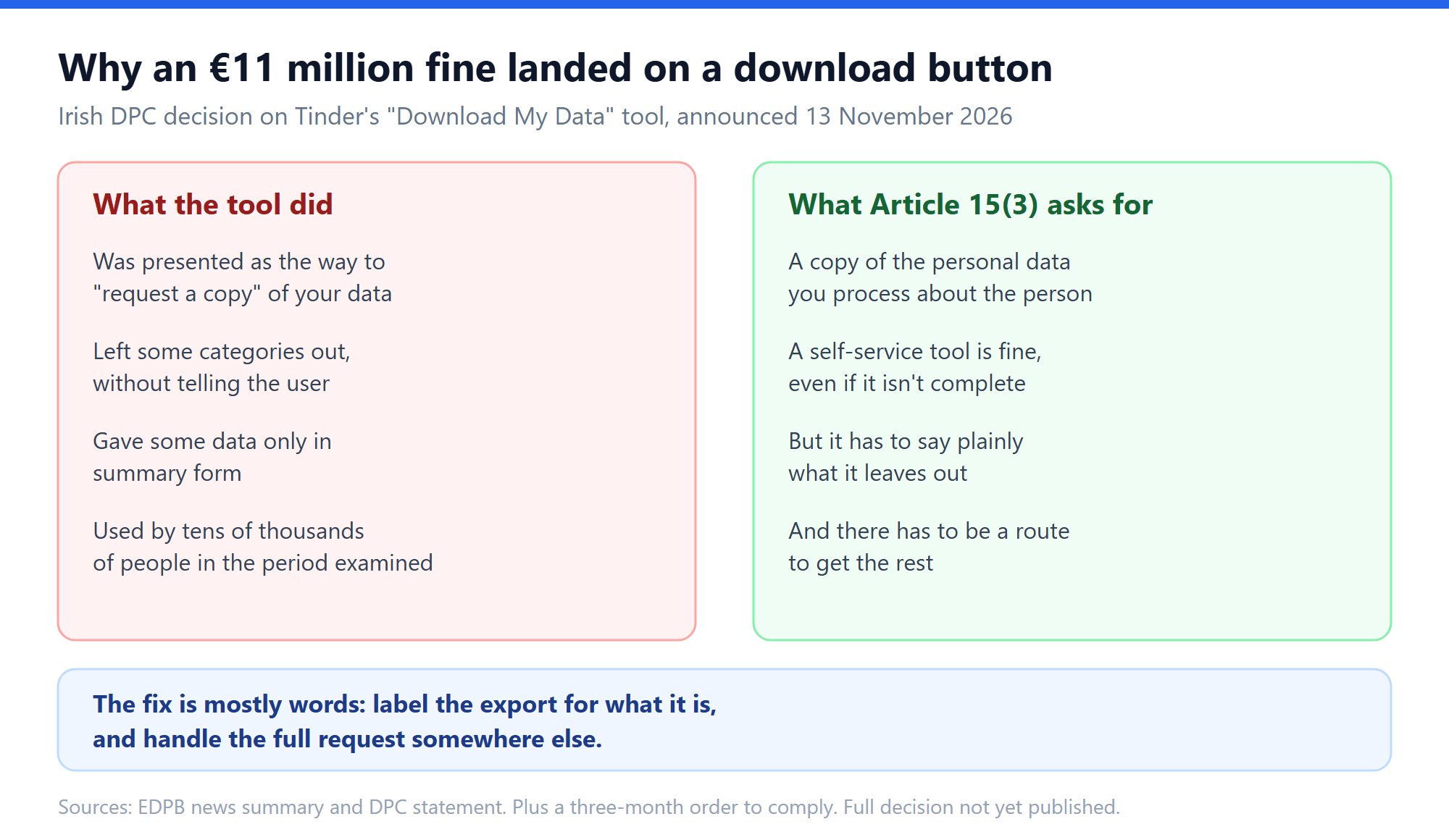
The decision turns on the Download My Data tool. Tinder described it as a way to “request a copy” of your personal data. According to the DPC, the tool didn’t provide all of it: some categories of information were left out without telling the user, and some were provided only in summary form. Tens of thousands of people used the tool during the period the DPC examined.
The outcome was a reprimand, the €11 million fine and an order to bring the processing into compliance within three months. The inquiry itself began in early 2020, so this took more than six years. The DPC says it’ll publish the full decision later.
The useful part: tools are allowed, silence isn’t
It would be easy to read this as “self-service export tools are risky”. That’s not what the regulator said. The DPC’s Deputy Commissioner Graham Doyle said that automated access tools can be a useful and efficient way to give people their data. As quoted in coverage of the decision, he added that these tools don’t need to provide a complete copy, but they must be fair and transparent about the extent of the data they provide.
So the failure was the gap between the label and the contents. A button that says “here’s your data” and returns half of it misleads the person into thinking their request has been answered. A button that says “this export includes your profile and messages; for anything else, contact us here” is honest, and it keeps the full request alive.
That distinction matters for anyone running a CRM, because CRM exports are almost always partial by design.
Why a CRM export is never the whole answer
A contact export gives you the contact record: name, numbers, email, a few custom fields. But a person’s data in a CRM rarely stops there. Their history is spread across the timeline, deals, call records, recordings, messages, consent flags and any scores or AI-written summaries your team has generated. We covered that last group in our post on inferred data and access requests, and it’s often the part people forget.
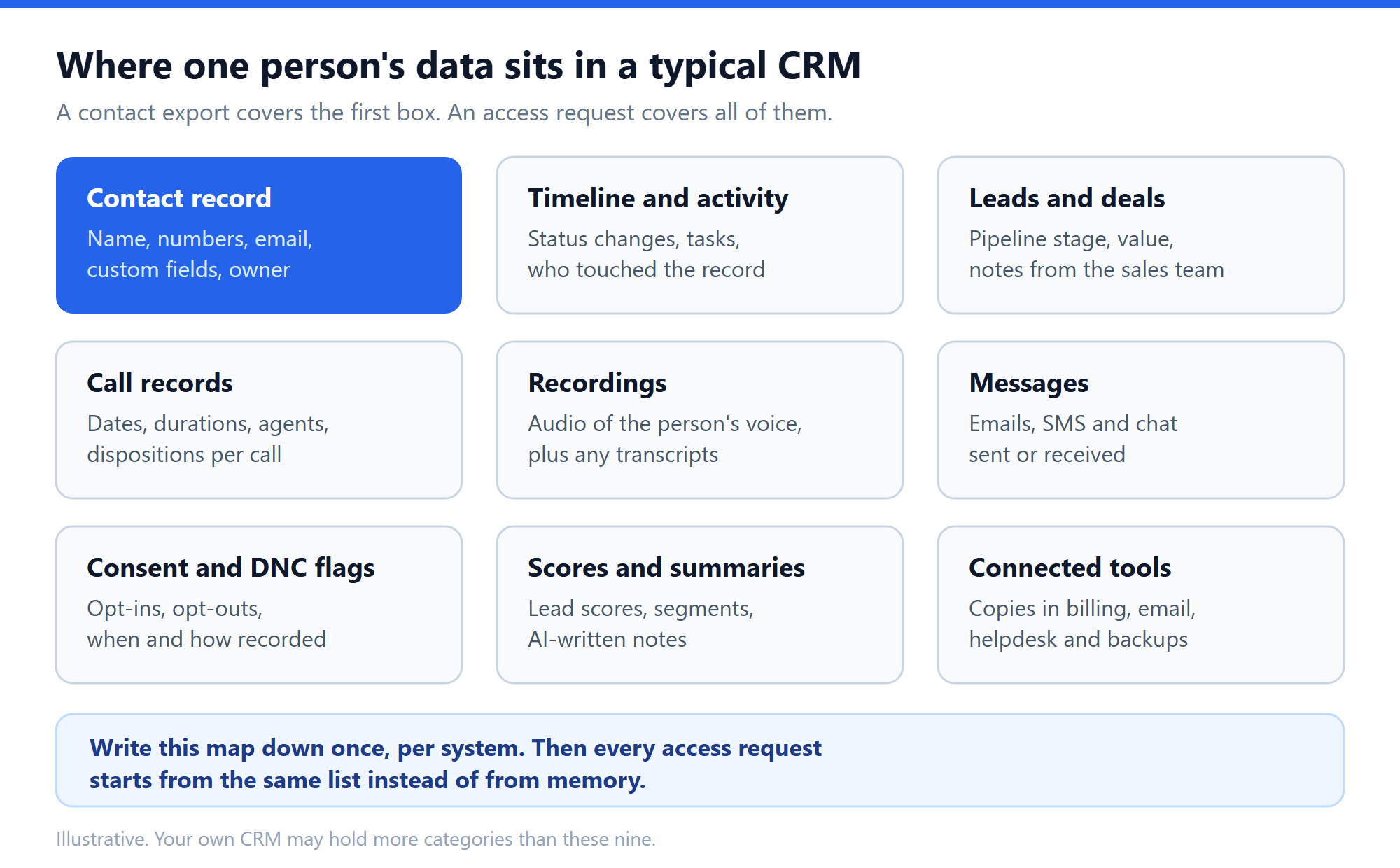
Then there’s everything outside the CRM: the billing system, the helpdesk, the email platform, backups. An access request covers all of it. If the only thing you send back is a CSV from the contacts screen, you’ve done exactly what the DPC objected to, just without the button.
How to answer an access request from your CRM
- Write the data map once. List every place a person’s data can sit in each system, like the map above. It takes an afternoon and turns every future request into a checklist instead of a memory test.
- Label partial exports honestly. If you offer self-service downloads, say what’s included and what isn’t, and tell people how to ask for the rest. That’s the whole lesson of this decision in one sentence.
- Pull from each source by the person, not by the screen. Search each area for the person’s identifiers (email, phone numbers, account IDs) and export the matching rows, rather than sending whatever one screen shows.
- Don’t summarise what you hold in detail. If you keep every call record, send the call records, not “you called us 14 times”. The DPC specifically criticised data provided in summary form only.
- Keep a record of what you sent. Note the sources you searched, what you included, anything you withheld and why, and the date. If the person complains, that log is your answer.
- Watch the clock. You normally have one month to respond under the GDPR, extendable in some cases. A data map is what makes one month comfortable.
None of this is legal advice, and the full decision may add detail once it’s published. But the direction is clear enough to act on now.
Doing this in ICTCRM
ICTCRM doesn’t have a one-click access request tool, and we’d rather say so than imply otherwise. What it does have is the pieces you need to assemble a complete answer. The contacts screen lets you search and export the filtered list as CSV, and each contact has a timeline showing status changes and activity, as described in the contacts guide. Leads and deals have their own export. Call records and recordings live in the reports area, where Export writes the rows matching your current filter to CSV, covered in the reports guide.
Filter each of those by the person, export, and you have most of the CRM side of the answer. Opt-outs and do-not-call status sit on the contact record too, which matters for the kind of sync failure we wrote about in the BBVA opt-out fine. If you self-host ICTCRM, the database is yours as well, so nothing about the person sits in a vendor system you can’t search.
Frequently asked questions
Why was Tinder fined €11 million?
Ireland’s Data Protection Commission found that Tinder’s Download My Data tool, which was presented as a way to request a copy of your data, left some categories out without telling users and gave some data only in summary form. That breached Article 15(3) of the GDPR. The decision was announced on 13 November 2026.
Are self-service data download tools allowed under the GDPR?
Yes. The DPC said automated tools can be a useful and efficient way to give people their data, and they don’t have to be complete. But they must be clear about what they include and what they leave out, so the person knows their request may not be fully answered.
Is a CRM contact export enough to answer an access request?
Usually not. A contact export covers the contact record, but a person’s data also sits in timelines, deals, call records, recordings, messages, consent flags, scores and connected systems. An access request covers all of the personal data you process about them.
How long do I have to answer a GDPR access request?
One month from receiving the request, in most cases. It can be extended by up to two further months for complex or numerous requests, but you have to tell the person within the first month and explain why.
Does ICTCRM have an automatic access request tool?
No. ICTCRM lets you search and export contacts, leads, deals, call records and recordings by filter, and shows each contact’s timeline. You combine those exports into the response. Self-hosted installs also give you direct access to the database.
What does Article 15(3) of the GDPR require?
It requires a company to provide a copy of the personal data it’s processing about the person who asks. Combined with the rest of Article 15, the person is also entitled to information such as the purposes, recipients and retention period.
Recent Comments