On 16 September, Salesforce instances stopped answering across every region. Logins failed, APIs failed, orgs were unreachable, and customers could not raise a support case because the Help portal was caught in it too. It lasted most of a working day, it happened on the opening day of Dreamforce, and the root cause field on the incident record is still empty.
What the record actually says
Rather than rely on the write-ups, we pulled the vendor’s own status record. Incident 20004433, service key coreService.
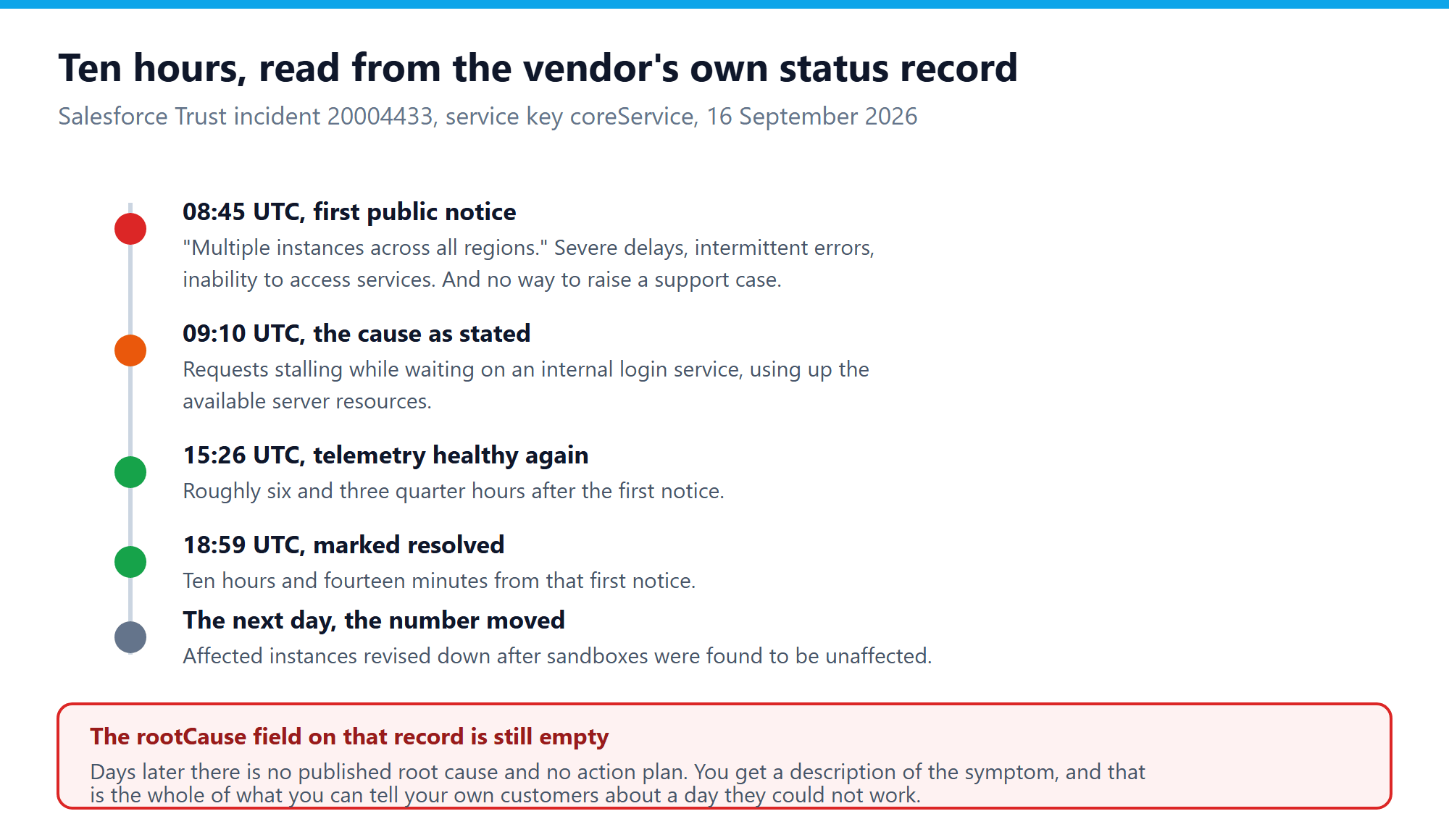
The first public update landed at 08:45 UTC, describing severe delays, intermittent errors and an inability to access services across multiple instances in all regions. At 09:10 UTC Salesforce named the mechanism: requests were stalling while waiting on a response from an internal login service, and that was consuming the available server resources. Telemetry was healthy again from 15:26 UTC, and the incident was marked resolved at 18:59 UTC.
That is roughly six and three quarter hours of degraded service and ten hours and fourteen minutes from first notice to all clear. If you have seen other numbers quoted, that is why. Different write-ups measured different things, and some picked the window from the first report to resolution while others used the impact window.
The count of affected instances moved more than once, and was revised down the following day when Salesforce found sandboxes had not been affected after all. That is a reasonable correction to make. It is also a reminder that the number you read during an incident is provisional.
The part that should bother you
Not the downtime. Everything fails eventually, and a vendor at that scale will have better uptime over a year than most companies manage on their own hardware. Be honest about that.
The part that should bother you is that the rootCause and actionPlan fields on that incident are still null days later. There is a description of the symptom and no published explanation. If a customer of yours asks why their orders did not go out on the sixteenth, everything you can tell them is a paraphrase of somebody else’s status page.
The second part is that the support portal went down with the product. The escalation path and the thing that broke shared a dependency, which is the sort of design detail nobody notices until the day it matters.
What this does and does not prove about self-hosting
It would be easy, and dishonest, to turn this into a claim that self-hosted CRM software does not go down. It does. Your disk fills up, your certificate expires, somebody applies an update on a Friday. Run your own infrastructure badly and you will beat this outage for downtime without much effort.
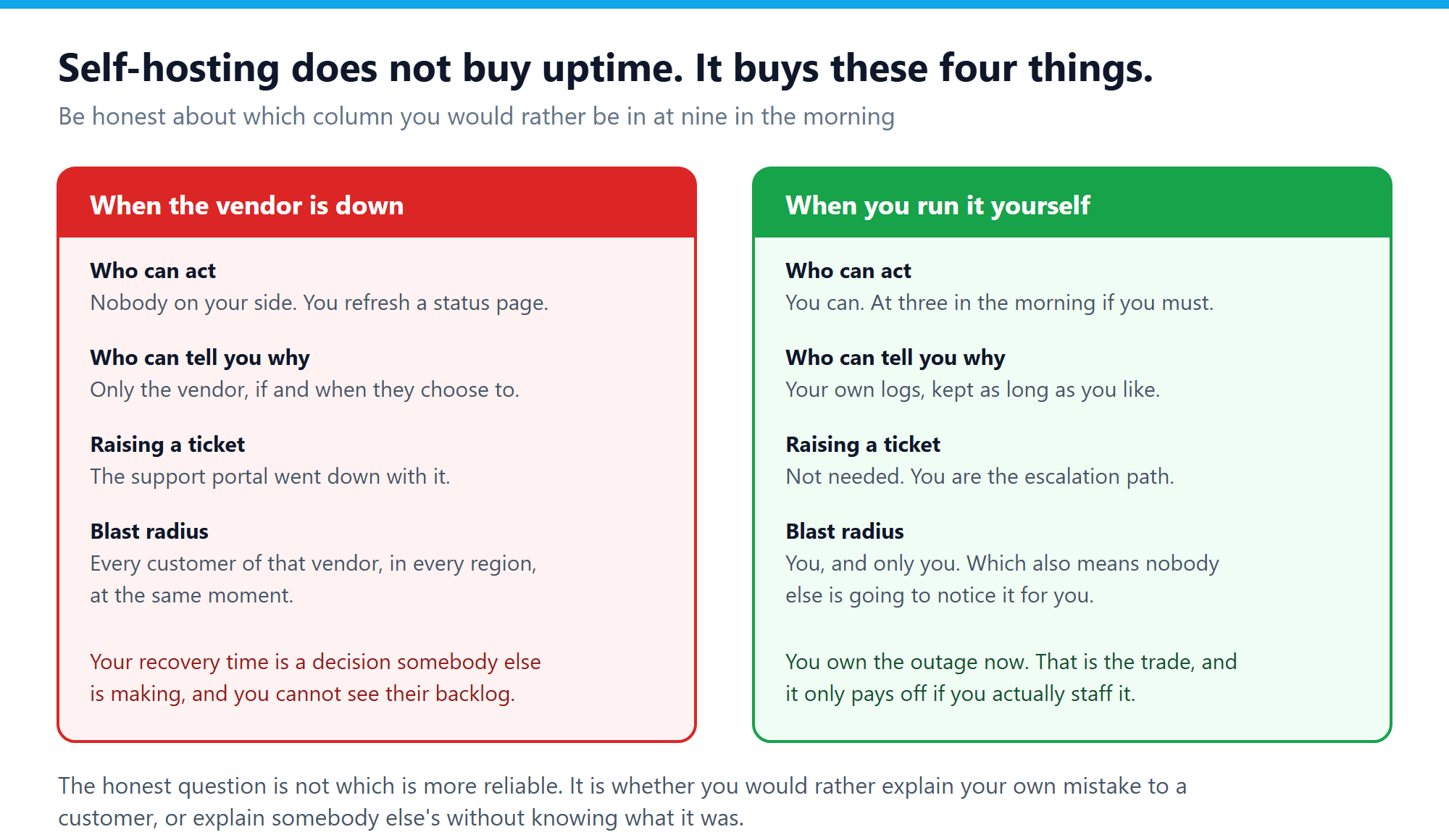
What changes is who owns the failure. On your own deployment you can restart the thing at three in the morning instead of refreshing a status page. Your logs are yours, so the explanation exists whether or not anyone chooses to publish it. And the blast radius is you, rather than every customer of one vendor in every region at the same moment.
That last one cuts both ways and it is worth saying plainly. A shared outage means nobody notices it for you. No status page lights up, no account manager calls. If you self-host and nobody is on call, you find out when a customer tells you, which is worse than any of this.
Three questions worth asking your own setup
Whichever way you deploy, this incident exposes questions that are cheap to answer now and expensive to answer during an outage.
- Does your escalation path share a dependency with the thing it escalates? Salesforce customers could not open a ticket because the ticket system needed the login service that had failed. If your monitoring, your status page or your on-call paging runs on the same infrastructure as the application, you have the same problem in miniature.
- Could you answer a customer asking what happened? Not could you repeat a vendor statement, but could you look at something you control and say what broke. If the answer is no, that is a decision you have already made without noticing.
- What does your team do for six hours with no CRM? The useful answer is not a workaround invented on the day. It is knowing in advance whether calls can still be logged, whether orders can be taken on paper, and who reconciles it afterwards.
The wider point about dependency
A single internal login service stalling was enough to make a platform unreachable everywhere at once. Not a data centre fire, not a cable cut. One component, under load, holding requests open until the resources ran out.
Every system has a component like that. The difference between deployment models is not whether the weak point exists, it is whether you are allowed to look at it, and whether you are the one who gets to decide how fast it comes back.
Frequently asked questions
How long was the outage exactly?
The vendor’s incident record shows the first update at 08:45 UTC and resolution at 18:59 UTC on 16 September, with telemetry healthy from 15:26 UTC. That gives about six and three quarter hours of impact and ten hours overall. Quoted figures vary because different sources measured different windows.
Was customer data lost?
Nothing in the incident record indicates data loss. This was an availability incident, not a data one, and it should not be described as a breach.
Does an SLA credit cover this?
Credits are usually a percentage of a monthly fee and rarely resemble the cost of a lost day of selling. Read yours before you rely on it, and check whether claiming is automatic or whether you have to file within a window.
Is self-hosted CRM more reliable?
Not automatically, and anyone telling you otherwise is selling something. It is more controllable. Whether that turns into better availability depends entirely on whether you staff it.
What is the cheapest improvement we can make this week?
Move your status and alerting off the same infrastructure as the application, and write down what the team does during an outage. Neither costs much, and both are worth more than an architecture debate you will not finish.
Recent Comments